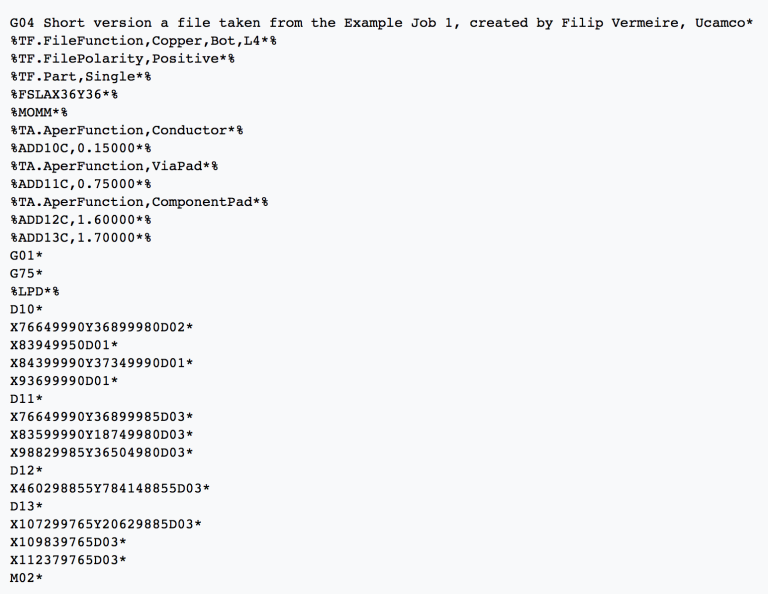
Below is an example of a Gerber file:
Checking for Possible PCB Fabrication Issues
Advanced Circuits has developed a free online tool, FreeDFM, to ensure your PCB`s Geber files are complete and free of manufacturability issues before you send your files to your PCB fabricator. After you have exported your Gerber files from your PCB design software of choice, you will want to make sure the Gerber files are compressed into a .Zip folder before uploading the files to FreeDFM.
First, make sure you are familiar with the common Gerber file extensions. You will need to specify each layer to ensure the check is done correctly. Common Gerber file extensions include:
- pcbname.GTL – Top Copper
- pcbname.GTS – Top Soldermask
- pcbname.GTO – Top Silkscreen
- pcbname.GBL – Bottom Copper
- pcbname.GBS – Bottom Soldermask
- pcbname.GBO – Bottom Silkscreen
- pcbname.TXT – Drills
- pcbname.GML/GKO – Board Outline
Next, FreeDFM will analyze each file to ensure that you are not missing any required files for manufacturing and will also for things that will cause issues in the manufacturing process or overall functionality such as inadequate Soldermask clearance, missing drill hits, line width and other issues.
Once the tool has completed the analysis of your Gerber files, you will receive a comprehensive report of all possible manufacturability issues found within minutes in your email inbox automatically and 100%. Being able to identity these issues prior to sending the files to the manufacturer saves you time by avoiding production holds, and also saves you money by receiving the design as intended on your first run.
Below are each of the items that FreeDFM checks for on each upload:
Complete ZIP Files
- Gerber file for each copper layer
- Gerber file for each soldermask layer
- Gerber file for each silkscreen layer
- Excellon or Gerber drill file
Inner Plane Layers
- Spacing
- Trace width
- Annular ring
- Inner clearance (drill to feature)
- Thermal reduction
Outer Layers
- Spacing
- Trace width
- Annular ring
Drill
- Double hits
- Missing hits
Inner Signal Layers
- Spacing
- Trace width
- Annular ring
- Inner clearance (drill to feature)
Soldermask
- Undersized clearances
- Missing clearances
Silkscreen
Line width